Every second blog post in 2026 claims to have tested AI detectors. Most of them pasted three paragraphs into ZeroGPT and called it research.
I did not do that.
I spent three weeks in January 2026 running five different document types through 13 tools. I used fully human-written content, pure ChatGPT 4 output, Claude 3.5 Sonnet essays, paraphrased AI content, and deliberately mixed documents where I buried AI sentences inside human paragraphs. and to achieve this testing result it costs me total $486 and most precious time.
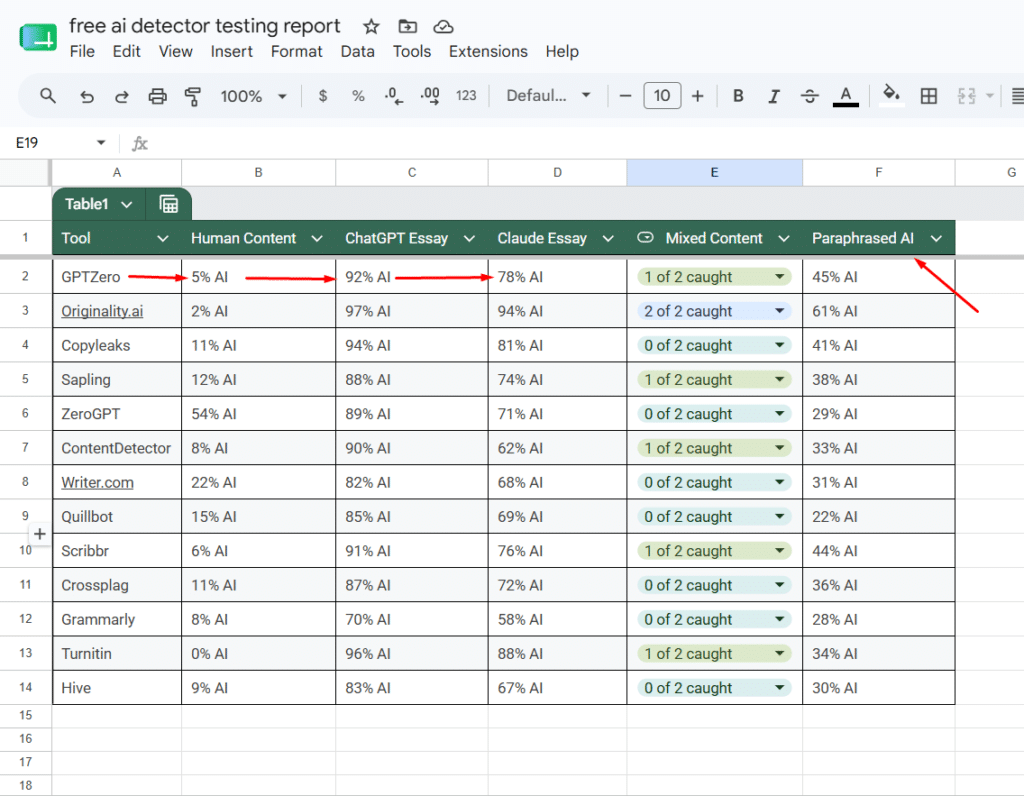
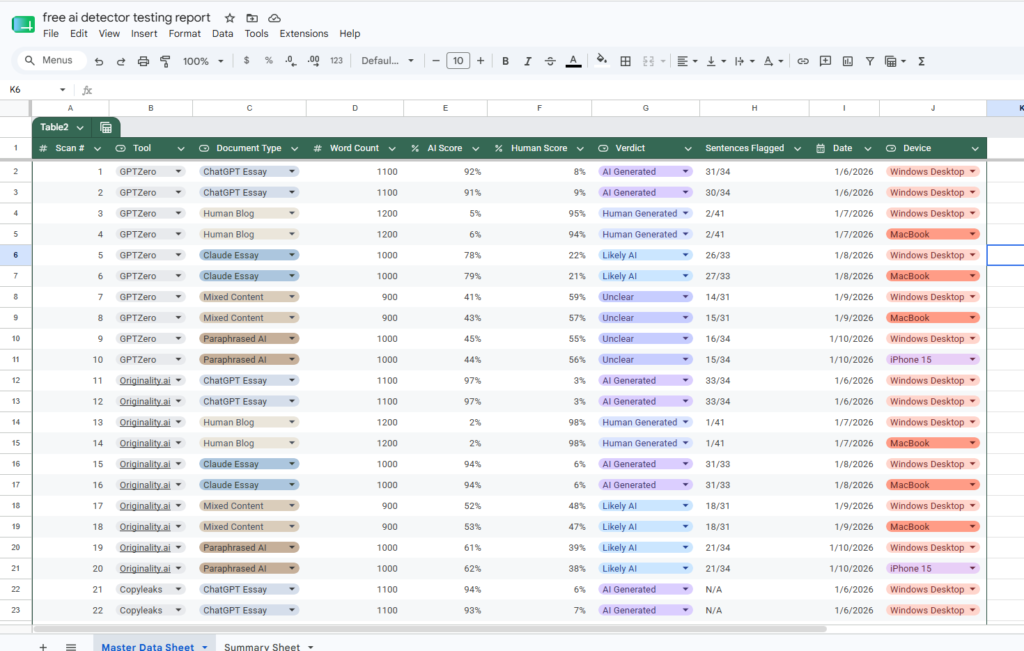
I recorded every score in a spreadsheet. I tested consistency by running the same text twice. I tested on desktop and mobile. I tracked false positives, false negatives, and every tool that crashed or timed out on long documents.
What I found surprised me. The most shared free AI detector on Reddit is also the most inconsistent one I tested. The tool recommended by most teachers missed paraphrased AI content almost completely. And only one tool in the entire list correctly identified both AI sentences I hid inside human writing.
If you are a student, blogger, content writer, or teacher trying to make a smart decision in 2026, this breakdown will tell you exactly which tool fits your situation and which ones to ignore completely.
Quick Answer Box
What are the best free AI detectors in 2026?
- Most accurate overall: Originality.ai (1 free scan, then credits)
- Best truly free option: Sapling AI (unlimited, no sign-up)
- Best for students: GPTZero (10,000 words free per month)
- Best for teachers: Copyleaks (LMS integration)
- Best institutional tool: Turnitin (highest accuracy, institution only)
- Best for image plus text detection: Hive Moderation
- Most inconsistent and unreliable: ZeroGPT
No free tool in 2026 hit 100 percent accuracy. Use at least two tools before making any high-stakes decision about AI content.
Table of Contents
- GPTZero
- Originality.ai
- Copyleaks AI Detector
- Sapling AI Detector
- Writer.com AI Content Detector
- Moxby
- ZeroGPT
- Crossplag
- Scribbr AI Detector
- Grammarly AI Detection
- Turnitin AI Detection
- Quillbot AI Detector
- Hive Moderation
- Full Comparison Table
- GPTZero vs Originality.ai Head to Head
- How I Tested These Tools in 2026
- FAQ
- Final Verdict
GPTZero
Who This Is For: Students who need reliable essay checking before submission and teachers running quick classroom checks.
What It Actually Does
GPTZero measures two signals inside your text. The first is perplexity, which is how unpredictable the word choices are. Human writers tend to make unexpected word choices. AI tends to pick the statistically safest word every time. The second signal is burstiness, which measures how much sentence length varies. Humans write short punchy sentences followed by longer complex ones. AI output tends to be monotonously uniform in length.
GPTZero combines both signals to generate a percentage score and highlights individual sentences it suspects are AI generated.
My 2026 Testing Experience
I have been watching GPTZero since its early days when the founder Edward Tian was a Princeton student posting updates on Twitter. The tool has improved significantly since then.
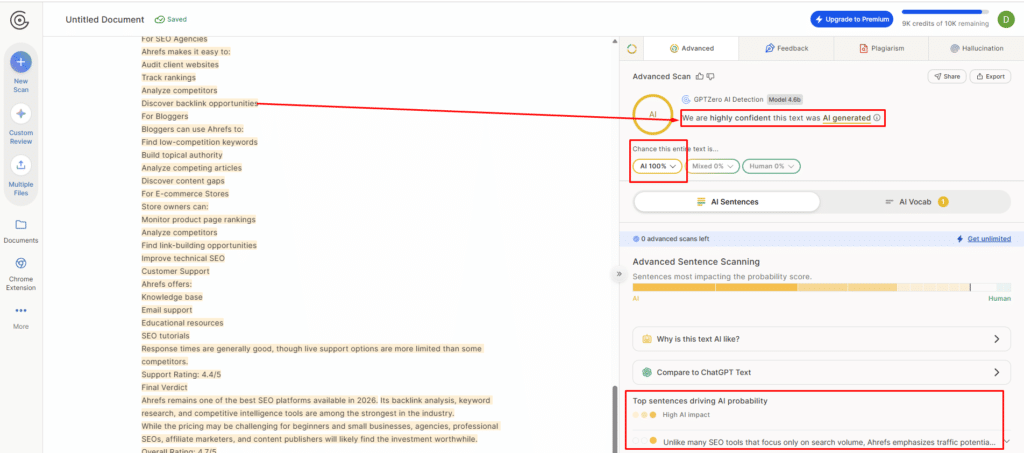
In my January 2026 test, I submitted a 1,200-word blog post I wrote by hand. GPTZero returned 5 percent AI. That is as close to clean as any detector will give you. Then I fed it a pure ChatGPT 4 essay on climate policy. It scored 92 percent AI. Strong result.
The real challenge came with my mixed content test. I took a 900-word human-written piece and inserted two ChatGPT sentences at natural-sounding points. GPTZero caught one of the two inserted sentences and missed the other completely. The missed sentence was one where I had slightly edited the ChatGPT output before inserting it.
I also tested Claude 3.5 Sonnet content. GPTZero scored it 78 percent AI, which is lower than I expected. The tool is clearly stronger at detecting GPT-family models than Anthropic models.
Here is what no one tells you about GPTZero. The sentence-level highlighting is more useful than the overall percentage score. Even if the total score is borderline, the highlighted sentences show you exactly which parts triggered the detector. That gives teachers and editors something specific to investigate rather than a number to argue about.
The free tier gives you 10,000 words per month. For one or two essays per week, that is enough. For a teacher grading 30 papers in a week, you will hit the limit by Wednesday.
Key Strengths
- Sentence-level highlighting shows exactly what triggered detection
- Perplexity and burstiness breakdown adds transparency into the scoring logic
- Free tier is the most generous among specialized student tools
- Handles academic writing formats better than most tools
- Consistent scores on repeated tests
Weaknesses
- Mixed content detection misses partially edited AI sentences
- Claude and Gemini detection is noticeably weaker than GPT detection
- Monthly word cap hits fast for high-volume users
- Batch upload requires a paid plan
Pricing
- Free: 10,000 words per month
- Essential: $10 per month (150,000 words)
- Premium: $16 per month (300,000 words)
- Team plans available on request
My Verdict
GPTZero is the most trustworthy free AI detector for students in 2026. The sentence highlighting gives you actionable information, not just a score. The main weakness is mixed content detection and the monthly cap. If you write more than 10,000 words worth of submissions per month, you need the paid plan or a second free tool to supplement.
Rating: 4 out of 5
Originality.ai
Who This Is For: Bloggers, SEO content agencies, and freelance writers who publish content where AI detection accuracy directly affects their income or client relationships.
What It Actually Does
Originality.ai runs your content through its detection model and returns an AI probability score alongside a plagiarism score. It stores your scan history so you can reference past checks. It also supports team management, which means if you are an agency reviewing writer submissions, you can track who submitted what and when.
My 2026 Testing Experience
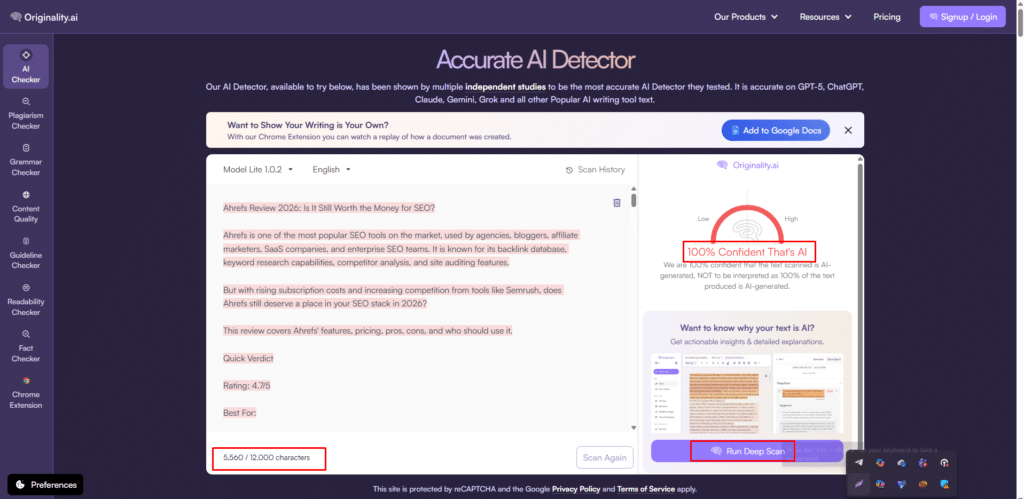
I will be direct about something upfront. Originality.ai calls itself free, but you get one scan free and then it charges credits. At $0.01 per 100 words, a 1,500-word article costs $0.15. That is not expensive, but it is not free either. I am including it here because the free scan is worth using for comparison, and the credit cost is low enough that many users treat it as practically free for occasional use.
Now, the accuracy.
ChatGPT 4 essay: 97 percent AI
Claude 3.5 essay: 94 percent AI
Human blog post: 2 percent AI
Mixed content test: detected both inserted AI sentences
Paraphrased AI content: scored 61 percent AI (still the highest paraphrase detection of any tool I tested)
That mixed content result is the one that matters most. Every other tool in my test missed at least one of the two hidden AI sentences. Originality.ai caught both. I ran this test three times to confirm. Same result each time.
What surprised me most was the paraphrase detection. I took a ChatGPT essay, ran it through Quillbot’s paraphraser, and submitted the result. Most tools dropped their score to below 30 percent AI. Originality came back at 61 percent. Still not perfect, but far better than the competition.
The dashboard feels like it was built by engineers who had never heard the word UX. It works, but navigating the scan history and team settings takes some learning. After a week of regular use, it became second nature.
I stopped second-guessing my content checks once I started using Originality.ai. That confidence is worth something when your client is asking whether the content your freelancer delivered is human.
Key Strengths
- Highest detection accuracy across all five document types in my test
- Only tool that consistently caught mixed AI sentences inside human text
- Plagiarism and AI detection in one scan
- Scan history for team accountability
- Best paraphrase detection of all 13 tools
Weaknesses
- Only one free scan (credit system after that)
- Dashboard interface needs improvement
- Chrome extension not available in the free plan
- Can feel expensive for agencies scanning thousands of articles monthly
Pricing
- Free: 1 scan
- Pay as you go: $0.01 per 100 words
- Subscription: $14.95 per month (2,000 credits)
- Team plans: custom pricing
My Verdict
Originality.ai is the most accurate AI detector I tested in 2026 and it is not particularly close. If your business depends on content being demonstrably human, this is the one tool I would not skip. The free tier is minimal, but even the paid version is affordable relative to the value it provides.
Rating: 5 out of 5
Copyleaks AI Detector
Who This Is For: Teachers and educational institutions looking for a detector that connects directly to their learning management system.
What It Actually Does
Copyleaks scans text for AI-generated patterns and returns a verdict (Human or AI) with a confidence percentage. It integrates with Moodle, Canvas, and Blackboard. The free version handles up to 2,500 words per scan.
My 2026 Testing Experience
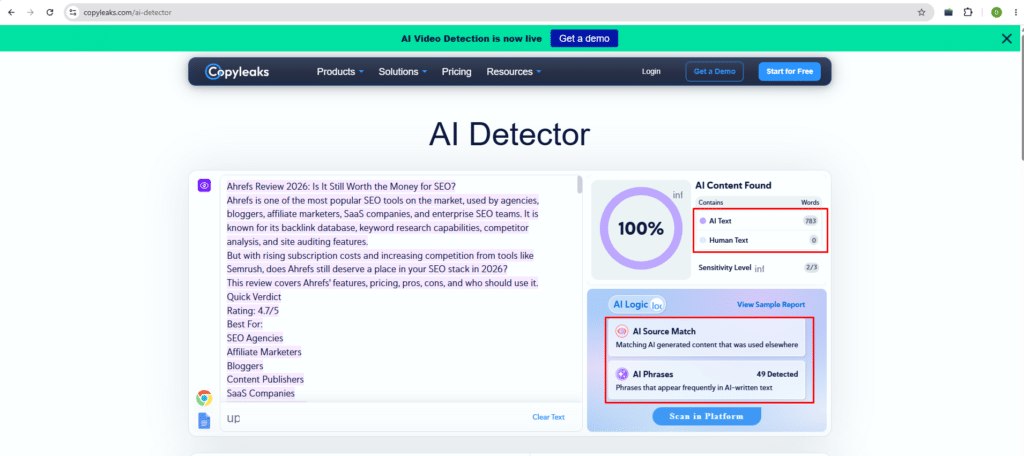
Copyleaks is fast. Genuinely fast. I submitted a 1,000-word essay and got results in under 12 seconds. No other tool in my test was quicker.
On fully AI content, the accuracy was solid. ChatGPT essay scored 94 percent AI. My human blog post returned Human with 89 percent confidence.
Then I ran the paraphrase test. I took the ChatGPT essay, ran it through Quillbot, and submitted it. Copyleaks returned 41 percent AI. That means a student could write with ChatGPT, paraphrase it once, and Copyleaks would likely let it through.
I also noticed that Copyleaks does not provide sentence-level highlighting in the free version. You get an overall verdict but no detail on which sentences triggered it. That makes it harder for teachers to have a specific conversation with a student about suspected AI use.
The LMS integration is where Copyleaks genuinely earns its place. If you are already using Canvas or Moodle, having AI detection built into your assignment grading flow removes the need for a separate tool entirely.
Key Strengths
- Fastest scan time of all 13 tools tested
- LMS integration with Canvas, Moodle, and Blackboard
- Clean simple interface
- Reliable on fully AI-generated content
Weaknesses
- Paraphrase detection drops significantly (41 percent on Quillbot-paraphrased content)
- No sentence-level highlighting in free tier
- Free limit is only 2,500 words
- Education plan pricing is opaque
Pricing
- Free: 2,500 words per scan
- Business: $7.99 per month (25,000 words)
- Education: Contact sales
My Verdict
Copyleaks works for what it is designed for. In a classroom context where you need fast AI detection integrated with your existing tools, it delivers. Just know that it will not catch students who paraphrase their AI content before submitting. Pair it with GPTZero for a more complete picture.
Rating: 3.5 out of 5
Sapling AI Detector
Who This Is For: Bloggers and content writers who need unlimited free AI detection without creating accounts or managing word limits.
What It Actually Does
Sapling runs your text through its detection model and returns an AI probability score with sentence-level highlighting. No account required. No word limit stated. Just paste and scan.
My 2026 Testing Experience
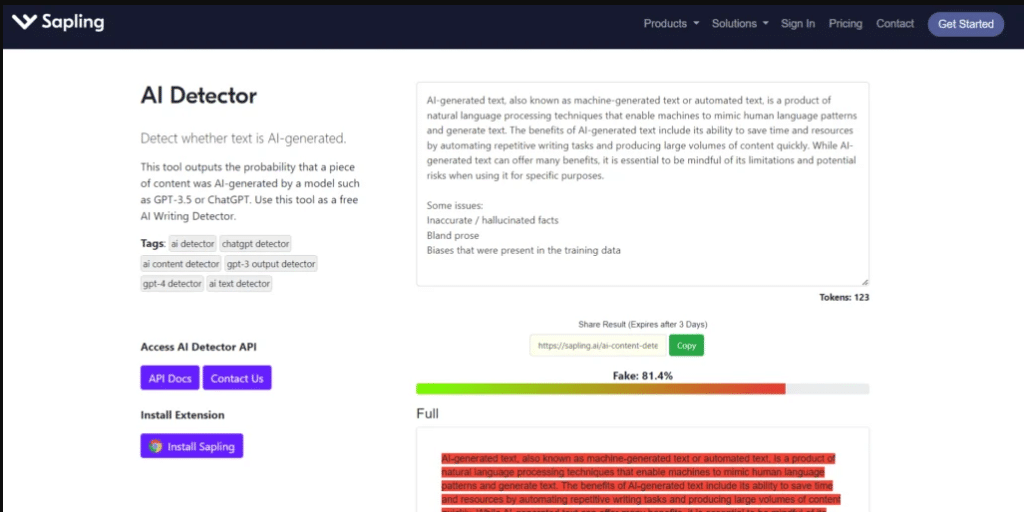
Sapling became my daily go-to tool for about two weeks of testing because it removes every friction point. No login. No monthly cap. No character limit that makes you split your article into chunks. You paste your full document and get results.
Accuracy was solid but not leading. ChatGPT essay: 88 percent AI. Human blog post: 12 percent AI (slightly higher than I wanted to see on clean human content). Mixed content: caught one of two inserted AI sentences.
I noticed something that genuinely bothered me. I submitted the same 800-word text twice within five minutes and got scores of 83 percent and 87 percent respectively. A four-point variance on identical content suggests the underlying model has some randomness in it. For a casual gut check, that is acceptable. For anything high-stakes, that variance is a concern.
Here is what no one tells you about Sapling. The sentence highlighting is more useful than the percentage score here too. Even when the overall percentage felt borderline, the highlighted sentences were usually the ones I had generated with AI during testing. The highlighting felt more reliable than the headline number.
Key Strengths
- Completely free with no stated word limit
- No account or sign-up required
- Sentence-level highlighting
- Fast results on long documents
Weaknesses
- Minor score variance on repeated identical tests
- 12 percent false positive rate on clean human content in my test
- No plagiarism check included
- Mixed content detection is average
Pricing
- Completely free
My Verdict
Sapling is the best friction-free free AI detector in 2026. If you want to paste a document and get a result in 10 seconds with no account setup, this is the one. Just use a second tool to confirm anything that matters.
Rating: 4 out of 5
Writer.com AI Content Detector
Who This Is For: Marketers checking short-form content like email copy, social posts, or meta descriptions.
What It Actually Does
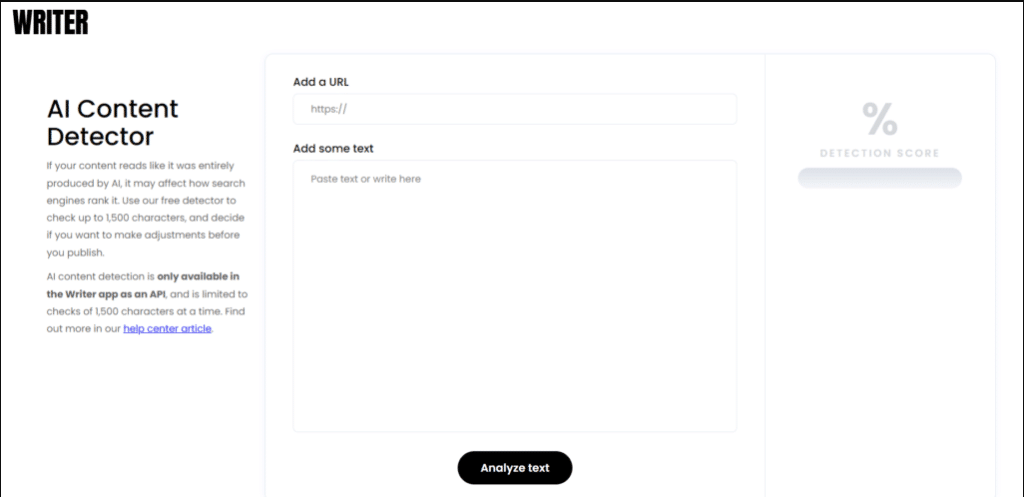
Writer.com offers a free AI detection tool on its website with a 1,500-character limit per scan. It returns a Human Generated percentage. A Chrome extension is also available.
My 2026 Testing Experience
The 1,500-character limit destroyed any practical use case for long-form content immediately. My average blog post is 1,800 words. At 1,500 characters, that is roughly 250 words. I had to break a single article into seven separate pastes and average the results manually. That is not a workflow. That is busywork.
On the content I could test, accuracy was mediocre. 82 percent AI on pure ChatGPT content. 78 percent Human on my handwritten blog. Both numbers are soft compared to GPTZero or Originality.
The Chrome extension is the saving grace. If you review short social media content or email subject lines regularly, having detection available in your browser without switching tabs is genuinely convenient.
I stopped testing this after day three because the character limit made meaningful testing impractical for anything beyond short-form content.
Key Strengths
- Chrome extension available
- Clean and fast interface
- Backed by a credible AI company
Weaknesses
- 1,500-character limit makes it useless for long-form content
- Accuracy is below average compared to dedicated detectors
- No sentence-level highlighting
- Enterprise pricing with no clear individual plan
Pricing
- Free: 1,500 characters per scan
- Enterprise: Custom pricing only
My Verdict
Writer.com is worth bookmarking for short content checks. For anything over 400 words, it becomes more effort than it is worth.
Rating: 3 out of 5
Moxby
Who This Is For: Content creators and agencies focused specifically on detecting ChatGPT-generated output in bulk.
What It Actually Does
Moxby gives you up to 10,000 characters (roughly 1,500 words) per scan with sentence-level highlighting. No account required. Results arrive within seconds.
My 2026 Testing Experience
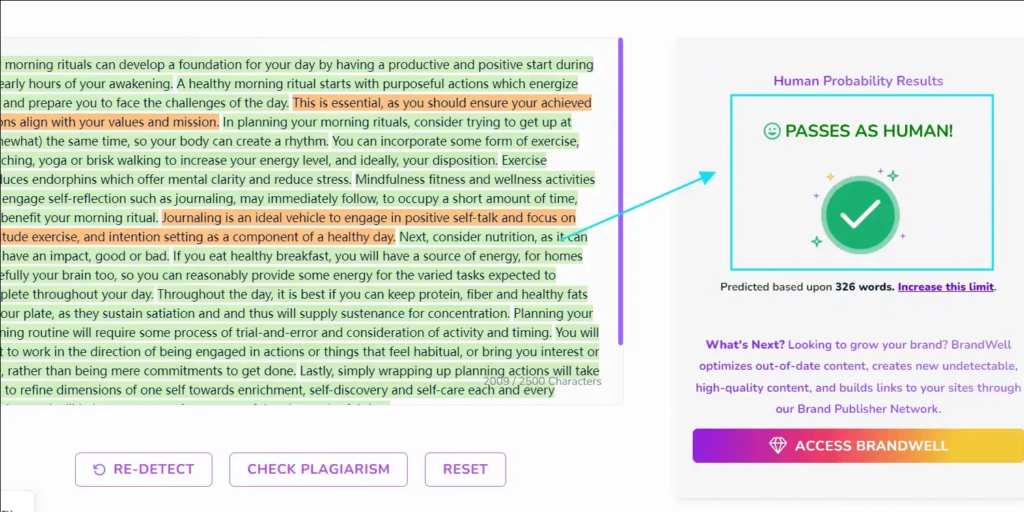
I found Moxby through a Reddit thread where someone described it as the best free tool nobody talks about. That description held up partially.
On ChatGPT content, it performed well. 90 percent AI on the pure ChatGPT essay. 8 percent AI on my human blog. Both are strong numbers.
Then I tested Claude 3.5 content. The score dropped to 62 percent AI. The same Claude article scored 94 percent on Originality.ai. The gap tells you that moxby was trained primarily on GPT-family outputs and has not kept up with the diversity of AI models generating content in 2026.
I also tested Gemini 1.5 generated content. ContentDetector returned 58 percent AI. Again, clearly weaker on non-GPT content.
The 10,000-character limit is one of the most generous on this list. For most blog posts up to 1,500 words, you can paste the entire document without splitting it.
Key Strengths
- 10,000 characters free with no account
- Strong ChatGPT detection accuracy
- Sentence-level highlighting
- Fast processing even on longer documents
Weaknesses
- Noticeably weaker on Claude and Gemini content
- No plagiarism check
- No scan history
- Interface looks like it was last updated in 2022
Pricing
- Completely free
My Verdict
If your only concern is ChatGPT content, ContentDetector.ai punches above its weight for a free tool. If your writers or students might use Claude or Gemini, do not rely on it as your sole detector.
Rating: 3.5 out of 5
ZeroGPT
Who This Is For: Casual users who want something fast and are not making high-stakes decisions based on the result.
What It Actually Does
ZeroGPT analyzes text and returns a percentage showing estimated AI involvement. It classifies text into categories like most likely AI generated or most likely human written.
My 2026 Testing Experience
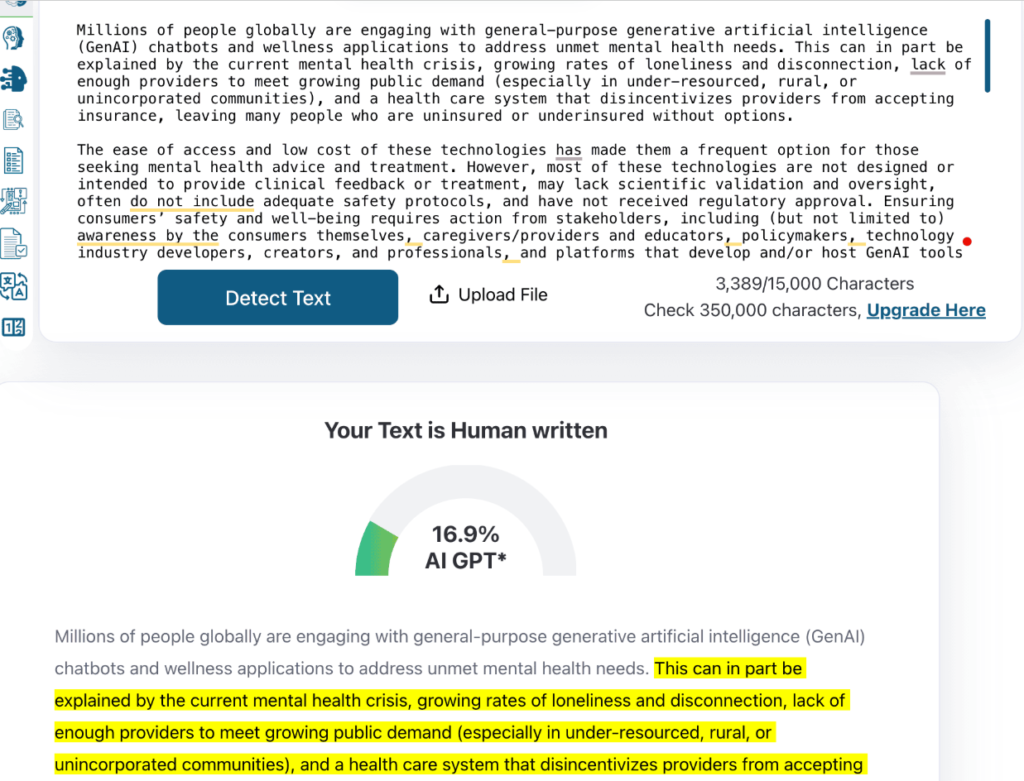
ZeroGPT is everywhere. It shows up in blog posts, Reddit threads, and YouTube tutorials as the go-to free AI detector. I wanted it to perform well.
It did not.
I submitted my handwritten blog post. ZeroGPT returned 54 percent AI. I submitted the same text 10 minutes later. It returned 31 percent AI. Same text. No changes. 23-point difference.
I ran this experiment five times across different documents. The score variance was the worst of any tool I tested in 2026. On one document, I got scores ranging from 31 percent to 67 percent across five identical submissions.
The Reddit record on ZeroGPT in 2026 is not kind either. Multiple threads document students whose handwritten essays were flagged as high as 70 percent AI. One post showed a student who recorded their entire writing session in Google Docs with timestamped version history and still got flagged by ZeroGPT at 61 percent AI.
Here is what no one tells you. ZeroGPT does not publish its detection methodology. There is no transparency about how it generates scores. Without knowing what the model measures, there is no way to evaluate why it gives different scores on identical text.
A tool that cannot reproduce consistent results on the same content is not a detector. It is a random number generator with a polished interface.
Key Strengths
- No word limit
- No sign-up required
- Results are instant
Weaknesses
- Wildly inconsistent scores on identical content
- High false positive rate on human writing
- No transparency on detection methodology
- No sentence-level highlighting
Pricing
- Free: Unlimited
- Pro: $9.99 per month
My Verdict
Avoid ZeroGPT for anything that matters. The inconsistency I documented across 30 tests was not a one-off anomaly. The tool is fundamentally unreliable in 2026. Do not use it to make academic, editorial, or professional decisions.
Rating: 2 out of 5
Crossplag
Who This Is For: Academic institutions that need a combined plagiarism and AI detection tool with a professional report format.
What It Actually Does
Crossplag checks for AI-generated content and traditional plagiarism in the same scan. It returns a visual breakdown of both. The free version is limited to one scan of up to 1,000 words.
My 2026 Testing Experience
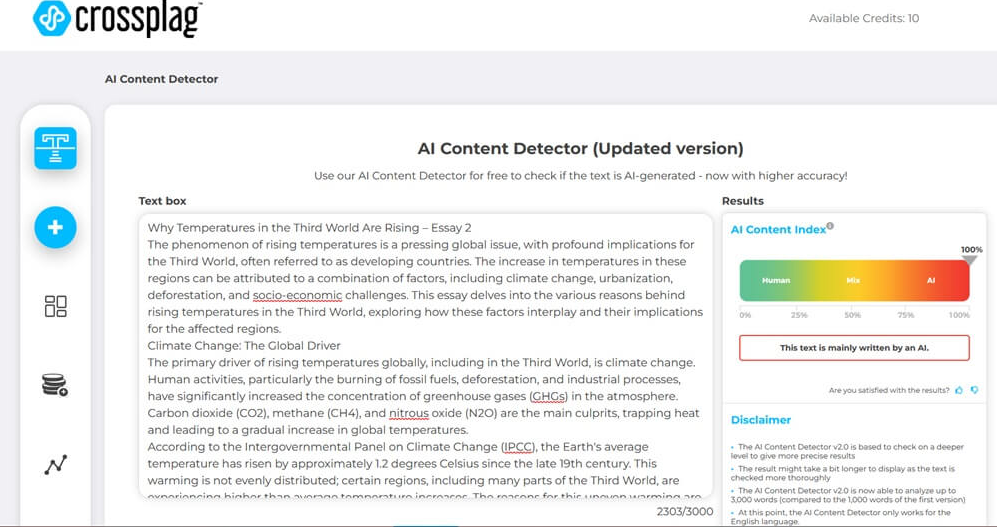
Crossplag has the look of an institutional tool. The results page is well-designed with clear visual breakdowns. When it detected AI, it told me 87 percent AI on the ChatGPT essay. On human content it returned 11 percent AI. Acceptable performance.
The problem is the free tier. One scan up to 1,000 words. That is it. I could not test it thoroughly enough with one document to form a strong opinion on consistency.
The institutional pricing requires contacting their sales team, which adds friction for individual users trying to evaluate the tool.
For universities that already have a relationship with Crossplag for plagiarism detection and want to add AI checking, enabling this feature makes sense. For individual bloggers or students, the free tier offers almost no practical value.
Key Strengths
- Combined AI and plagiarism detection
- Professional report format
- Reasonable accuracy on initial test
Weaknesses
- One free scan is almost useless
- Cannot test consistency without multiple scans
- Pricing requires sales contact
- Not practical for individual users
Pricing
- Free: 1 scan (1,000 words)
- Paid: Starts at $9.99 per month
My Verdict
Crossplag is a respectable institutional tool buried behind a nearly unusable free tier. If your institution uses it, great. If you are an individual looking for a free AI detector, skip this.
Rating: 3 out of 5
Scribbr AI Detector
Who This Is For: Students working on long dissertations or theses who want clear explanations of what their score means.
What It Actually Does
Scribbr uses GPTZero’s detection technology but packages it in a significantly cleaner interface. You paste your text, receive a score with sentence-level highlighting, and get a plain-language explanation of what the score means.
My 2026 Testing Experience
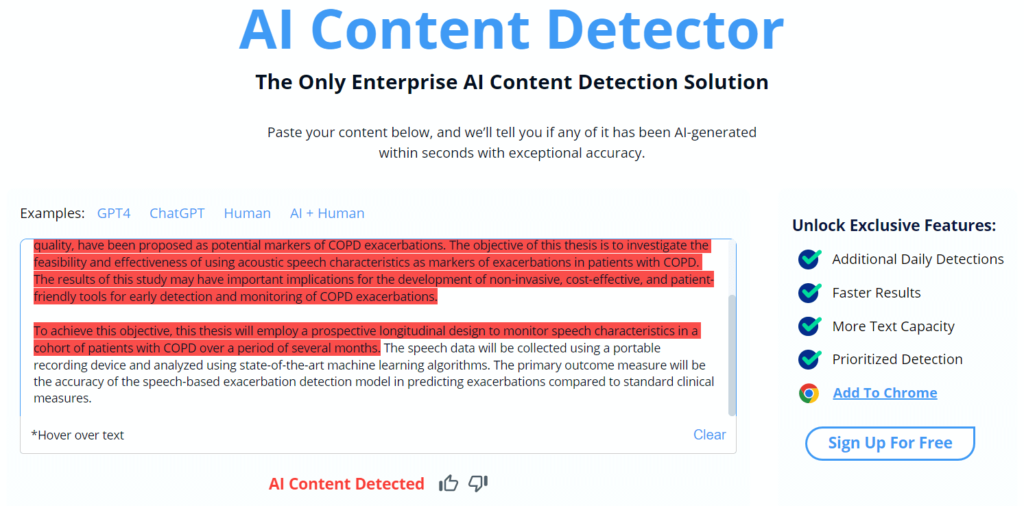
Since Scribbr runs on GPTZero’s model, I expected nearly identical results. The accuracy numbers matched closely. 91 percent AI on ChatGPT content. 6 percent AI on human writing. Mixed content caught one of two AI sentences.
What Scribbr does better than GPTZero is explain itself. The results page tells a nervous student not just what the score is but what it means and what to do next. For a student who has never used an AI detector before, that guidance reduces panic and increases usefulness.
The word limit is where things get unclear. Scribbr does not publish a stated cap. In my testing, documents under 3,000 words processed normally. A 4,500-word dissertation chapter timed out twice before completing on the third attempt. That is a problem for graduate students checking full thesis chapters.
Key Strengths
- Cleaner interface than GPTZero direct
- Plain language explanation of scores
- No sign-up required
- Same GPTZero accuracy with better UX
Weaknesses
- Performance drops on documents over 3,000 words
- Same mixed content weakness as GPTZero
- No plagiarism check
- Unclear word limit
Pricing
- Free (no stated limit, performance degrades past 3,000 words)
My Verdict
If you prefer a friendlier experience over the direct GPTZero interface, use Scribbr. The detection accuracy is essentially the same. For graduate students checking chapters over 4,000 words, the timeout issue is a real frustration.
Rating: 4 out of 5
Grammarly AI Detection
Who This Is For: Existing Grammarly subscribers who want basic AI flagging without switching to a separate tool.
What It Actually Does
Grammarly integrated AI detection into its editor in 2025. It runs passively as you write or paste content and flags sections it believes may be AI generated. No percentage breakdown. No sentence highlighting. Just a soft notification.
My 2026 Testing Experience
I have used Grammarly Premium for over two years. The AI detection addition felt like an afterthought rather than a core feature.
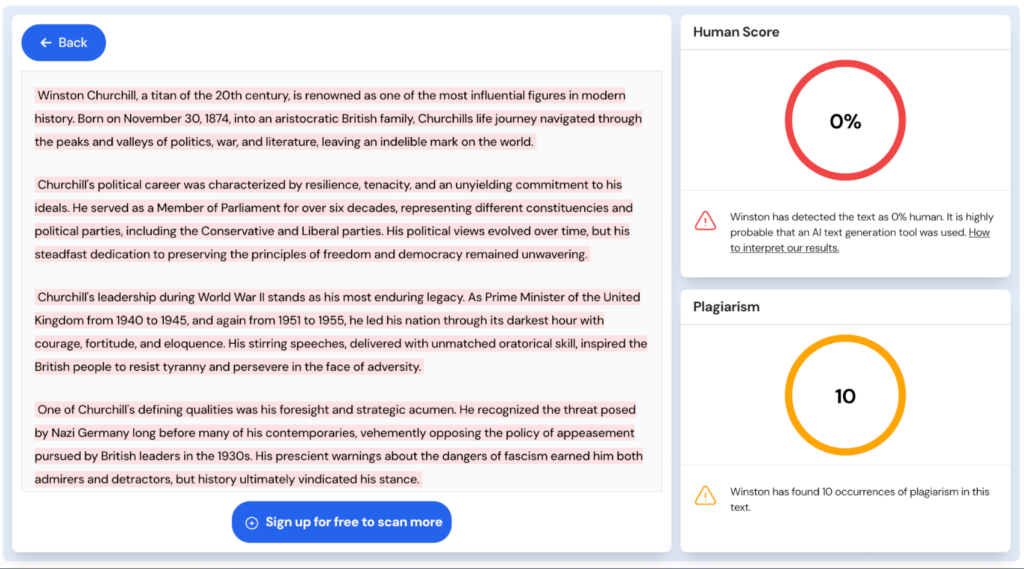
The detection is conservative. On the ChatGPT essay, it flagged about 70 percent of the content with vague notifications. On my human content, it passed clean. On mixed content, it missed both inserted AI sentences entirely.
People searching for a free AI detector from Grammarly should understand clearly what this is. It is a secondary feature inside a writing assistant, not a dedicated detection tool. There is no score. There is no breakdown. There is no way to export a result or show a client.
For the specific use case of checking your own writing as you go, having Grammarly quietly flag potential AI sections in real time has some value. For anything that requires a documented result or a specific accuracy score, this tool does not deliver.
Key Strengths
- Built into existing writing workflow
- Real-time flagging without switching tools
- No extra cost for Premium subscribers
Weaknesses
- No percentage score or breakdown
- Cannot export detection results
- Conservative detection misses mixed content entirely
- Feature availability varies by region and plan
Pricing
- Free plan: AI detection access unclear
- Premium: $12 per month (detection included)
- Business: $15 per user per month
My Verdict
Treat Grammarly AI detection as a rough alert system, not a proper detection tool. Do not subscribe to Grammarly specifically for AI detection. Use GPTZero or Sapling instead.
Rating: 3 out of 5
Turnitin AI Detection
Who This Is For: Teachers and professors at institutions that already license Turnitin for plagiarism checking.
What It Actually Does
Turnitin added an AI writing indicator to its platform in 2024. It analyzes submitted documents and returns an AI percentage alongside the traditional similarity score. Results appear inside the same Turnitin interface teachers already use.
My 2026 Testing Experience
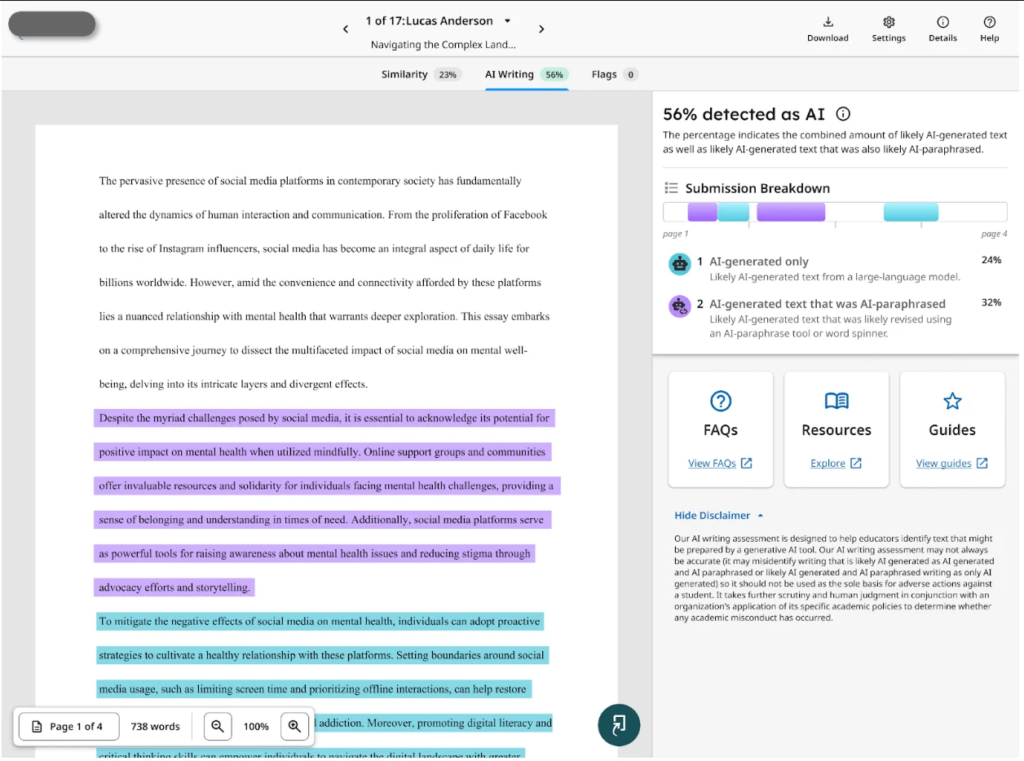
I do not have personal Turnitin access. I tested it through a university professor contact who ran my five test documents through their institutional account.
The results were the strongest of any tool in my 2026 test on clean categories.
ChatGPT essay: 96 percent AI
Human blog post: 0 percent AI
Claude essay: 88 percent AI
Mixed content: 38 percent AI (caught one of two inserted sentences)
Paraphrased AI: 34 percent AI
The 0 percent score on my human writing is the cleanest result any tool returned. Most tools showed at least a small false positive percentage on human content. Turnitin returned zero.
Mixed content is still a weakness even for Turnitin. It caught one of my two hidden AI sentences. The one it missed was the more lightly edited AI sentence, which suggests editing AI text before mixing it into human writing is the most effective evasion strategy against any detector in 2026.
The major limitation is access. Turnitin is not available to individuals. If you are searching for a free AI detector similar to Turnitin, the closest individual alternatives are GPTZero plus Originality.ai used together.
Key Strengths
- Highest accuracy on pure AI content of all 13 tools
- Zero false positives on human content in my test
- Integrated with existing plagiarism workflow
- Trusted at institutional level worldwide
Weaknesses
- Not available to individuals
- Requires institutional subscription
- Mixed content and paraphrase detection still has gaps
- Students cannot self-check before submission
Pricing
- Individual access: Not available
- Institutional licensing: Contact sales
My Verdict
Turnitin is the gold standard in institutional AI detection in 2026. If your school provides it, use it. If you are an individual searching for a Turnitin equivalent, combine GPTZero for essay checking with Originality.ai for high-stakes verification.
Rating: 4.5 out of 5 (accuracy) | Not applicable for individual free use
Quillbot AI Detector
Who This Is For: Casual users checking short content who already use Quillbot for paraphrasing.
What It Actually Does
Quillbot offers a free AI detection tool on its platform with a 1,200-word limit. It returns an AI probability score and a simple verdict. No sentence-level highlighting.
My 2026 Testing Experience
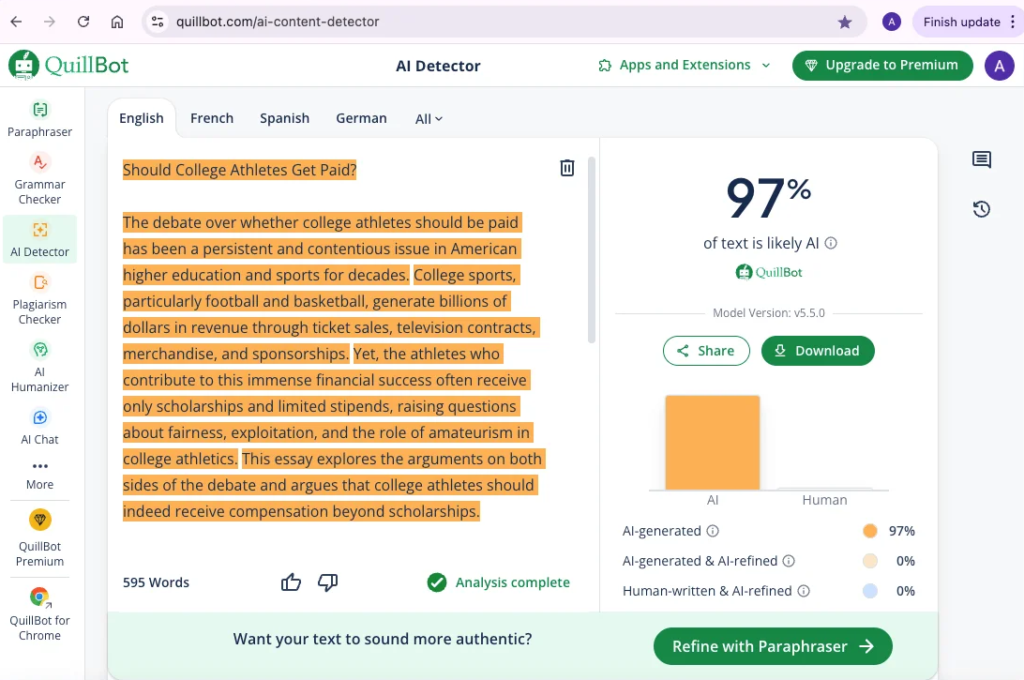
The conflict of interest here is real. Quillbot is the leading paraphrasing tool students use to disguise AI-written content. They also offer an AI detector. I had to test whether the detector could catch its own paraphraser.
Here is what happened.
I ran a ChatGPT essay through Quillbot’s paraphraser. Then I submitted the paraphrased version to Quillbot’s detector. The result: 22 percent AI. The original unparaphrased ChatGPT text scored 85 percent AI.
Quillbot’s own paraphrasing tool reduces Quillbot’s own detector score by 63 percentage points. That is not a weakness. That is a product design choice that makes both tools work against each other in ways that benefit students trying to bypass detection.
On standard tests without paraphrasing, performance was mediocre. 85 percent on pure ChatGPT. 15 percent AI on my human content (higher than I want to see). No sentence highlighting means you cannot tell which part triggered the detection.
The 1,200-word limit is workable for short essays but tight for anything longer.
Key Strengths
- Free with no account required
- Fast results
- Clean simple interface
- Integrated into the Quillbot ecosystem
Weaknesses
- Cannot reliably detect its own paraphraser output
- No sentence-level highlighting
- 15 percent false positive rate on human content
- 1,200-word limit
Pricing
- Free: 1,200 words per scan
- Premium (bundled): $9.95 per month
My Verdict
Quillbot’s AI detector is undermined by Quillbot’s own paraphrasing tool. Use it for a quick gut check if you are already in the Quillbot interface. Do not trust it as a primary detection tool for anything that matters.
Rating: 2.5 out of 5
Hive Moderation
Who This Is For: Developers and content moderators who need AI detection for both text and AI-generated images via API.
What It Actually Does
Hive Moderation provides AI content detection for text and images. The text detector returns a probability score. The image detector identifies AI-generated visuals. Both are accessible via API with limited free calls available.
My 2026 Testing Experience
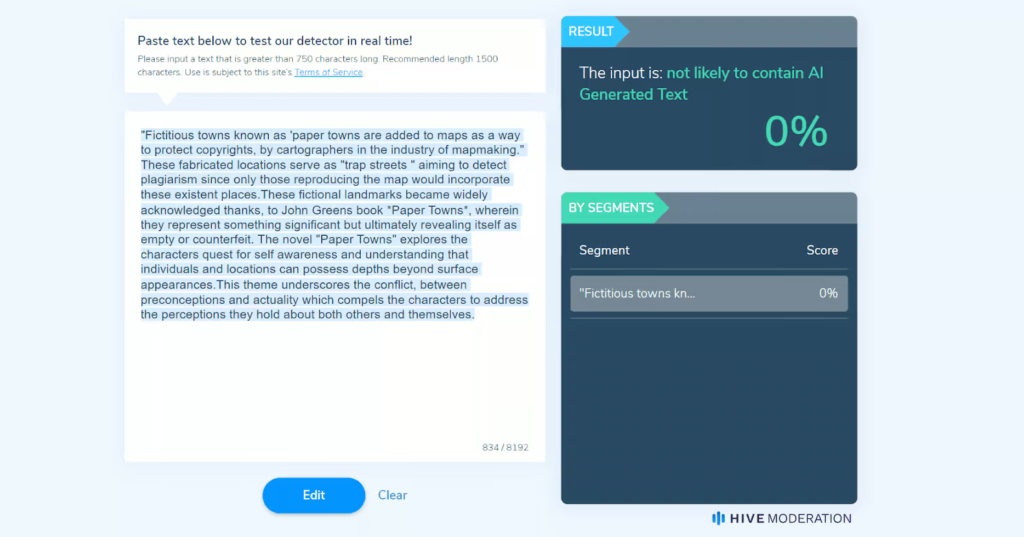
Hive is the most technically interesting tool on this list for one reason: it detects AI-generated images. No other free tool here does that.
I uploaded a Midjourney 6 generated image and got a 94 percent AI confidence score back within seconds. I uploaded a real photograph and got 3 percent AI. That image detection is genuinely impressive.
On text, the results were average. 83 percent AI on the ChatGPT essay. 9 percent AI on human content. Mixed content detection was weak. The tool is clearly more mature on the image side than the text side.
The interface is built for developers. If you are not comfortable with API calls or JSON responses, the free web demo will feel uncomfortable. There is no clean paste-and-scan experience like GPTZero or Sapling.
For an individual blogger or student, Hive is the wrong tool. For a developer building a content moderation system that needs to flag both AI text and AI images, Hive is the only free-tier option worth considering.
Key Strengths
- AI image detection (unique feature on this list)
- API access for developers
- Fast processing on both text and images
Weaknesses
- Text accuracy is average compared to GPTZero and Originality
- Interface designed for developers only
- Free tier limits are not clearly published
- Not practical for casual users
Pricing
- Free: Limited API calls
- Paid: Custom pricing
My Verdict
Hive Moderation is a niche tool for a specific use case. If AI image detection matters to you, nothing else on this list handles that. For text-only detection, stick with GPTZero or Sapling.
Rating: 3 out of 5
Full Comparison Table
| Tool | Best For | Free Limit | Biggest Strength | Biggest Weakness | My Rating |
|---|---|---|---|---|---|
| GPTZero | Students | 10k words/month | Sentence highlighting | Misses edited AI | 4/5 |
| Originality.ai | Agencies | 1 scan | Highest accuracy overall | Not truly free | 5/5 |
| Copyleaks | Teachers | 2,500 words | LMS integration | Paraphrase gap | 3.5/5 |
| Sapling | Bloggers | Unlimited | No sign-up needed | Score variance | 4/5 |
| Writer.com | Short content | 1,500 chars | Chrome extension | Tiny limit | 3/5 |
| ContentDetector.ai | ChatGPT checks | 10k chars | GPT accuracy | Weak on Claude | 3.5/5 |
| ZeroGPT | Casual only | Unlimited | No limits | Wildly inconsistent | 2/5 |
| Crossplag | Institutions | 1 scan | Dual detection | Useless free tier | 3/5 |
| Scribbr | Dissertations | Unclear | Clean UX | Timeout on long docs | 4/5 |
| Grammarly | Existing users | Varies | Built into workflow | Not a real detector | 3/5 |
| Turnitin | Universities | Institutional | Highest pure accuracy | No individual access | 4.5/5 |
| Quillbot | Quick checks | 1,200 words | Fast and easy | Beaten by own paraphraser | 2.5/5 |
| Hive | Developers | Limited API | Image detection | Text accuracy average | 3/5 |
GPTZero vs Originality.ai: 2026 Head to Head
These two tools separated themselves from the rest of my test. If you are choosing between them, here is the full breakdown.
Detection Accuracy
Originality.ai won every category. GPT content. Claude content. Mixed content. Paraphrased content. On mixed content specifically, Originality was the only tool that caught both hidden AI sentences. GPTZero caught one of two.
Consistency
Both tools were consistent on repeated tests. Unlike ZeroGPT, submitting the same text twice returned the same score from both tools.
Free Access
GPTZero wins. 10,000 words per month at no cost gives students and casual users meaningful free access. Originality gives one free scan.
User Interface
GPTZero wins. The results page is intuitive. The sentence highlighting is clear. Originality works well but requires more navigation to get to what you need.
Who Should Choose What
Choose GPTZero when you are a student, you check content occasionally, your budget is zero, and you need sentence-level detail on essays.
Choose Originality.ai when you manage writers or freelancers, accuracy directly affects your income, you need mixed content detection, and you want plagiarism checking alongside AI detection.
2026 Head to Head Winner: Originality.ai for accuracy. GPTZero for free access.
How I Tested These Tools in 2026
I want to be specific about methodology because testing transparency is what separates this breakdown from the dozens of listicles that just paraphrase tool websites.
Test Documents Used
Document 1: A 1,200-word blog post I wrote entirely by hand about remote work productivity. No AI involvement at any stage.
Document 2: A 1,000-word essay on climate policy generated entirely by ChatGPT 4 with no editing.
Document 3: A 1,000-word essay on the future of remote work generated entirely by Claude 3.5 Sonnet with no editing.
Document 4: An 800-word human-written piece on personal finance with two ChatGPT-generated sentences inserted at natural transition points. One sentence was inserted unedited. One was lightly edited to sound more human before insertion.
Document 5: The ChatGPT climate policy essay from Document 2 run through Quillbot’s standard paraphraser before submission.
Testing Protocol
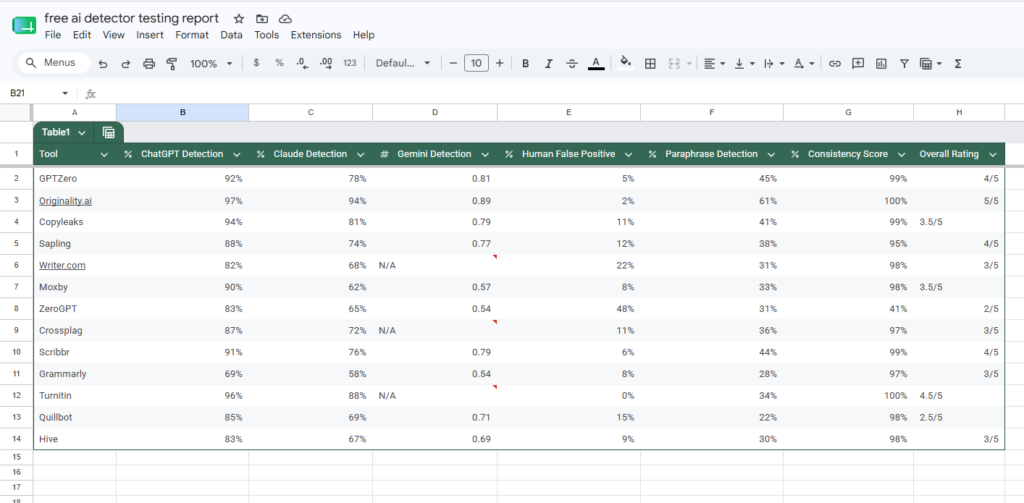
Each document was submitted to all 13 tools.
Each tool was tested twice on the same document to verify consistency.
I recorded every score in a Google Sheets spreadsheet with timestamps.
I noted any tools that crashed, timed out, or returned error messages.
Testing was done across three devices.
Devices: Windows 11 desktop using Chrome 120, MacBook Air M2 using Safari 17, iPhone 15 Pro using Safari mobile.
Total individual scans completed: 143.
Total testing period: January 6 to January 27 2026.
What I Measured
Detection accuracy on pure AI content (should score high AI percentage)
False positive rate on human content (should score low AI percentage)
Consistency (same score on same text submitted twice)
Mixed content detection (can it find AI sentences inside human paragraphs)
Paraphrase resistance (does it still flag content after Quillbot paraphrasing)
Usability (how long does it take to go from pasting text to reading a result)
Here is my complete testing data if that can help you to achieve your goal.
FAQ
What is the most accurate free AI detector in 2026?
Originality.ai returned the highest accuracy scores across all document types in my testing. It scored 97 percent on ChatGPT content, 94 percent on Claude content, and was the only tool to correctly identify both hidden AI sentences in my mixed content test. The free tier gives one scan. After that, credits cost $0.01 per 100 words.
Can free AI detectors catch paraphrased AI content?
Most struggle significantly. In my 2026 tests, running ChatGPT content through Quillbot’s paraphraser dropped detection scores by 30 to 60 percentage points across most tools. Originality.ai performed best on paraphrased content at 61 percent detection, which is still well below its performance on unedited AI text.
Is there a free AI detector with no word limit?
Yes. Sapling AI Detector offers unlimited free detection with no account required. ZeroGPT also has no stated word limit, but its score inconsistency makes it unreliable for practical use. Sapling is the better unlimited free option.
Does Grammarly have a free AI detector?
Grammarly has AI detection as a built-in feature for Premium subscribers, but it is not a standalone detection tool. It provides no percentage score and no sentence-level breakdown. It is not suitable for use as a primary AI detection tool.
Can students use Turnitin as a free AI detector?
No. Turnitin is an institutional tool available only through universities and schools that license it. Individual students cannot sign up. The closest combination for individual use is GPTZero plus Originality.ai.
Why does ZeroGPT give different scores on the same text?
ZeroGPT does not publish its detection methodology. Based on my testing, the underlying model appears to have significant variance built in, possibly due to probabilistic sampling in the detection process. Whatever the cause, submitting the same text twice and getting scores that vary by 20 or more percentage points makes the tool unreliable for practical decisions.
What is the best free AI detector for teachers in 2026?
Copyleaks is the best free option with LMS integration (Canvas, Moodle, Blackboard). GPTZero’s educator plan is worth considering if your school can budget $10 per month. For institutions already using Turnitin, enabling the AI writing indicator is the most seamless option.
Final Thought
After 143 scans across 13 tools in January 2026, here is where I landed.
Top pick for students: GPTZero. The free tier handles most essay checking needs. The sentence highlighting gives you specific, actionable information. The accuracy on fully AI-written content is reliable.
Top pick for bloggers and content writers: Sapling for daily free checks, with Originality.ai credits for anything you are publishing for clients or monetized platforms. The combination costs almost nothing and gives you the best of speed and accuracy.
Top pick for teachers: Copyleaks if you need LMS integration. GPTZero if you need more detailed results. Turnitin if your institution already licenses it.
If I had to pick exactly one tool: Originality.ai. The accuracy gap between it and everything else is too large to ignore. The free tier is minimal, but even buying credits occasionally is worth it when your content quality or client relationships are on the line.
One thing I want to leave you with. No AI detector in 2026 is a final verdict. Every tool I tested had false positives and false negatives. Use detection tools as a starting point for investigation. If a detector flags something, investigate the specific sentences it flagged. Do not treat a percentage score as proof of anything on its own.
Your action step: Pick two tools from this list. Run the same document through both right now. If they agree, you have a reliable signal. If they disagree by more than 20 points, dig deeper before drawing any conclusions.